

Universelle Dreifach-4K-Display-Dockingstation USB-C oder USB-A
Über diesen Artikel
Passt gut zu
VERSAND AM SELBEN TAG, Bestellung bis 11:00 Uhr (EST)
Kostenloser Versand für Bestellungen über 50 $
Technischer Support
30 Tage Rückgaberecht
1 Jahr Garantie
Universelle Dreifach-4K-Display-Dockingstation USB-C oder USB-A
Produktdetails
Schließen Sie ein einziges Kabel an, um Ihren Windows- oder Mac-Laptop zu verwandeln – einschließlich Intel oder M1/M2/M3 Modelle – in ein Multi-Monitor-Setup mit der UPTab 4K Triple Display USB-C Dockingstation. Dieses Dock ist eines der ersten, das USB 3.2-Innovationen anwendet und DisplayLink und DisplayPort „Alternate Mode“ des USB-C-Standards für den Hauptausgang nutzt. Es gehört außerdem zu den ersten Geräten, die eine USB-Stromversorgung mit 100 W bieten, sodass die Dockingstation einen Laptop, ein 2-in-1-Gerät oder ein Windows-Tablet aufladen kann. Nicht jeder USB-C-Anschluss unterstützt den DP-Alt-Modus oder das PD-Laden; Es ist ein vollständig kompatibler USB-C-, USB4-, Thunderbolt 3- oder Thunderbolt 4-Anschluss erforderlich.
USB-C-Host-Verbindung für dreifache 4K-Monitore:

Beim Anschluss an einen USB-A 3.2 (USB 3.0)-Host gibt es Einschränkungen, bis zu zwei Monitore und das Aufladen eines Laptops ist nicht möglich.
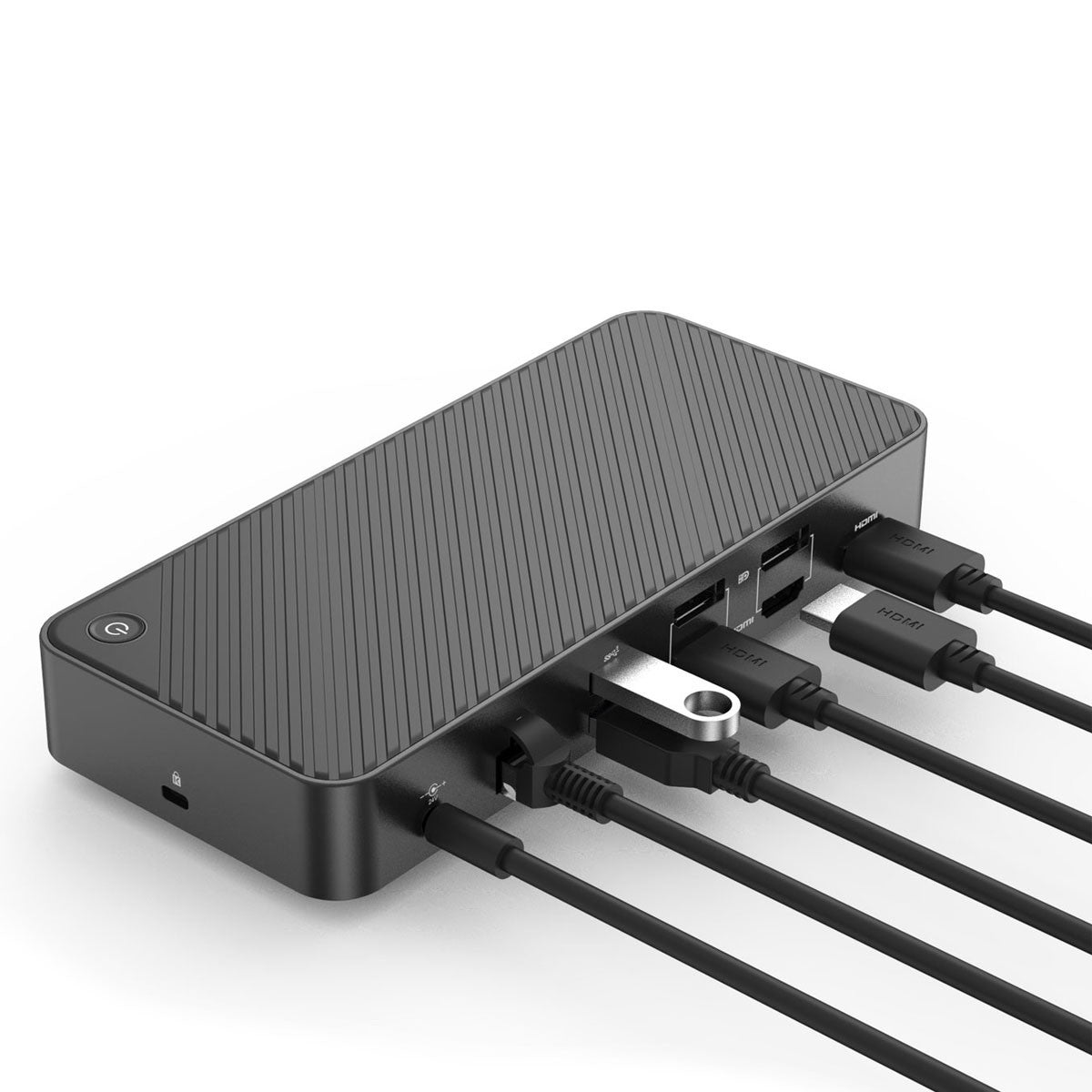
Einfache Einrichtung: Das Plug-and-Play-Design ermöglicht es Ihnen, alles mit einem Kabel anzuschließen und anzudocken. Schließen Sie einfach das Dockingstationskabel an, um Ihr Gerät aufzuladen, und greifen Sie sofort auf externe Monitore, Tastatur, Maus und mehr zu. Verwandelt Ihren Laptop/Tablet in einen Desktop-PC und vermeidet Kabelsalat auf Ihrem Schreibtisch. UPTab der lokalen Marke in den USA. Entwickelt, um Ihre Produktivität zu steigern.
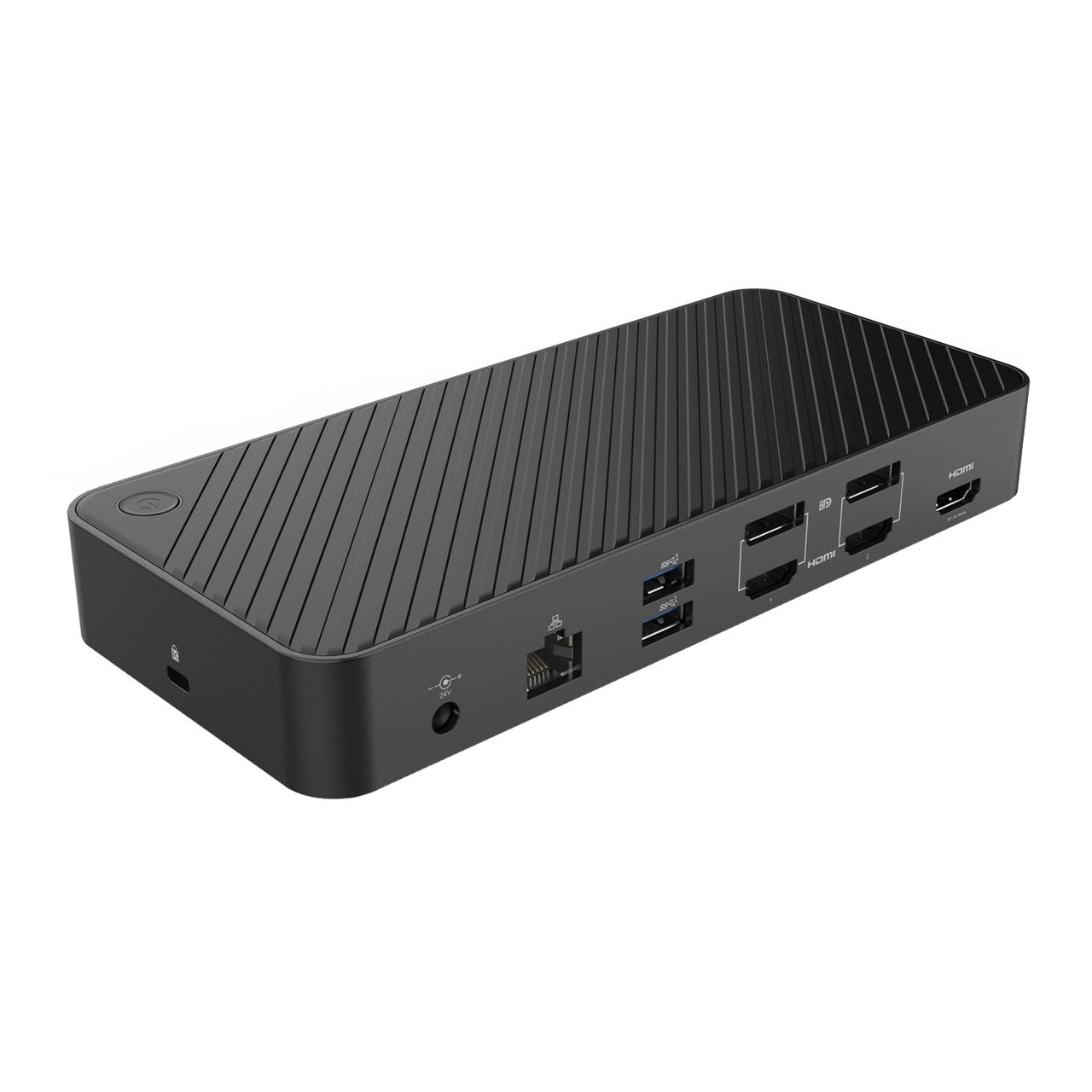
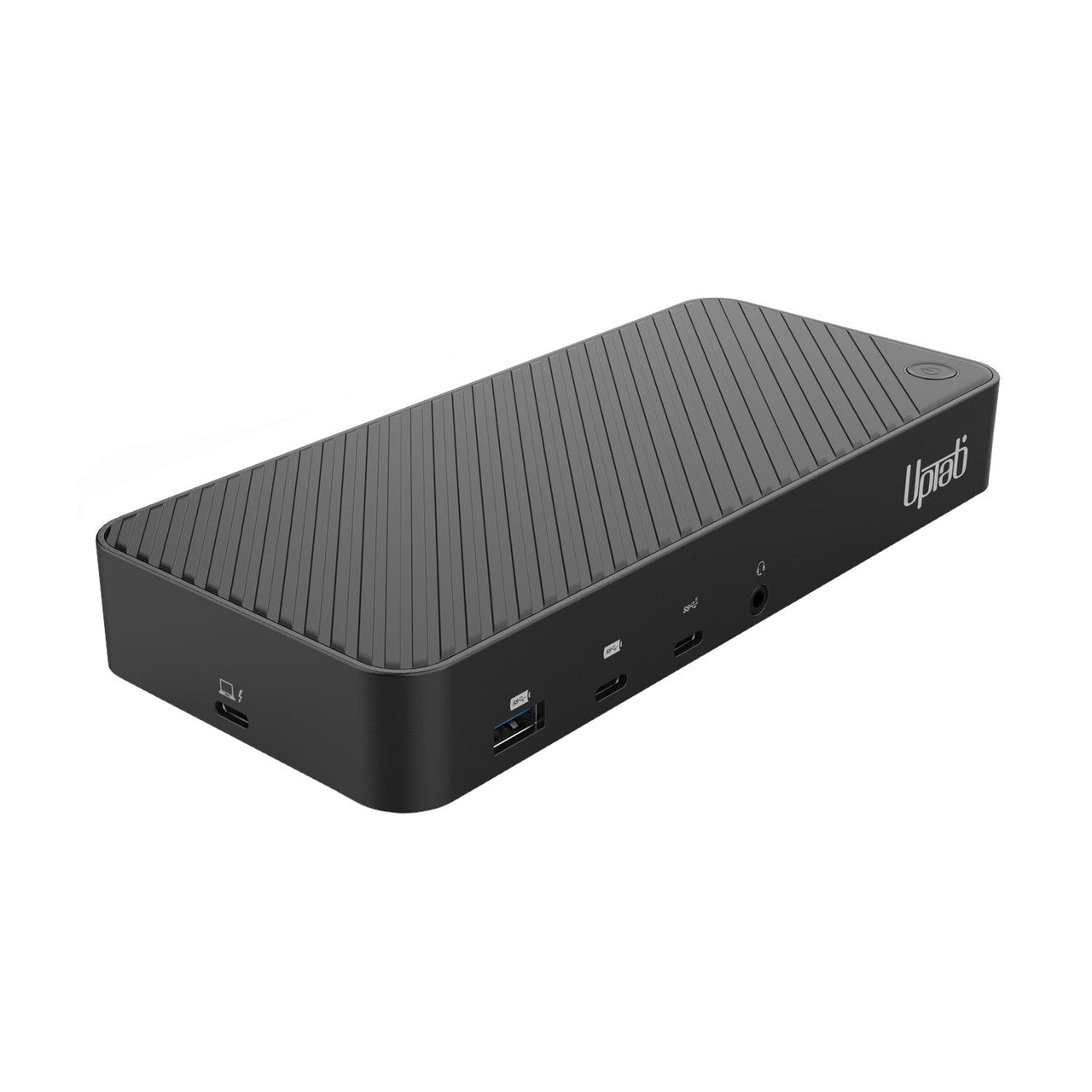
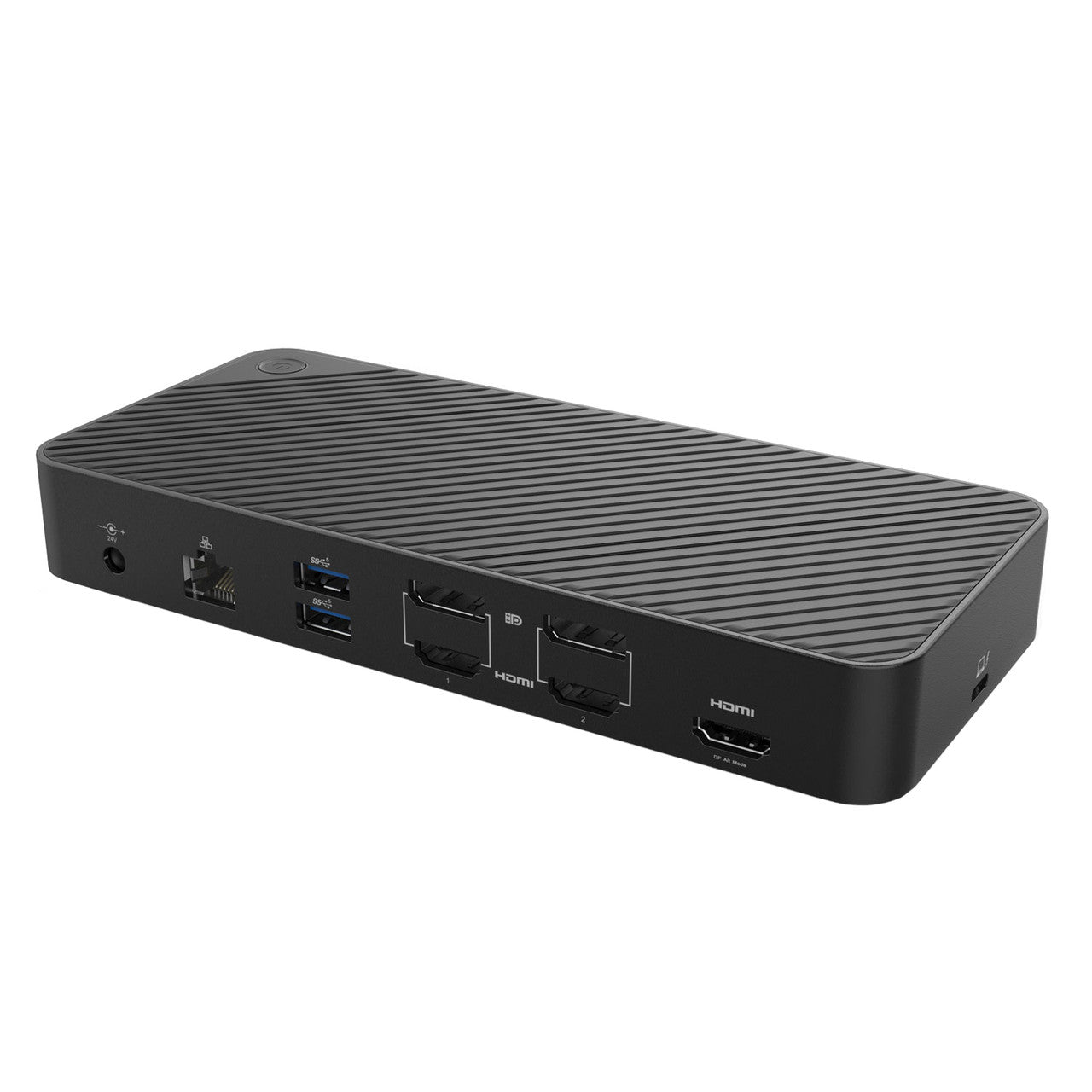
UPTab DisplayLink-Dockingstation. Vorder- und Rückseite:

- Eingang: USB-C 3.2 Gen 2 oder USB-A 3.2 Gen 1 (USB 3.0) – USB-C- und USB-A-Kabel im Lieferumfang enthalten
- USB-A 3.2 Gen 2 (10 Gbit/s mit BC 1.2-Aufladung)
- USB-C 3.2 Gen 2 (10 Gbit/s mit BC 1.2-Aufladung)
- USB-C 3.2 Gen 1 (5 Gbit/s)
- AUX/MIC 3,5-mm-Audio- und Mikrofonanschluss
- 100-Watt-Stromversorgung für einen Laptop. Gesamtleistung 130 Watt (24 V/5,4 A)
- Gigabit-Ethernet (10/100/1000)
- 2x USB-A 3.2 Gen 1 (5 Gbit/s)
- DisplayPort oder HDMI: 4K bei 60 Hz (3840 x 2160)
- DisplayPort oder HDMI: 4K bei 60 Hz (3840 x 2160)
- HDMI 4K bei 30 Hz (3840 x 2160) – DP-Alt-Modus
- K-Steckplatz für ein Laptopschloss im Kensington-Stil
Diese USB-C-Gen-2-Dockingstation mit DP 1.4- und HDMI 2.0 HDR-Unterstützung ist die perfekte Wahl für die Einrichtung von zwei oder drei Monitoren und unterstützt bis zu zwei 4K-60-Hz- und einen 4K-bei-30-Hz-Anzeigeausgang mit einer beliebigen Kombination aus drei DisplayPort- oder HDMI-Videoschnittstellen auf USB-C-Gen-2-Laptops (mit DP-1.4-Unterstützung), MacBooks und Windows-basierten Thunderbolt-3/4-Laptops.
Laden Sie Smartphones und andere Geräte über zwei nach vorne gerichtete Ladeanschlüsse mit BC 1.2 für USB-A- und USB-C-Geräte.
Schnellladeanschlüsse unterstützen das ständige Laden, sodass Geräte unabhängig davon aufgeladen werden, ob ein Host-Laptop angeschlossen ist oder nicht.
USB-A (USB 3.0) Host-Verbindung für zwei 4K-Monitore:

Hochauflösende Displays: Erhalten Sie mehr Platz auf dem Bildschirm für mehr Produktivität. Hochauflösende Displays (sowohl DisplayPort, nicht HDMI) verändern die Art und Weise, wie Sie Ihre außer Kontrolle geratenen Tabs und Ihren Arbeitsablauf verwalten.
Keine körnigen Bilder und winzigen Bildschirme mehr. Erweitern Sie Ihre Bildschirmfläche mit diesem Dock und verkürzen Sie die Zeit, die Sie für die Arbeit an hochproduktiven Aufgaben benötigen.
Hinweis: Um 4K 60 Hz zu erreichen, muss jeder angeschlossene Monitor und jedes angeschlossene Kabel die gewünschte Auflösung und Bildwiederholfrequenz unterstützen. Ältere USB-A-Laptops unterstützen nur die Einrichtung mit zwei Monitoren.
Kompatibilität:
Apfel M3: Mit unserer DisplayLink-Dockingstation können Sie die Beschränkung auf einen externen Monitor im neuen MacBook Air\Pro von Apple überwinden M3 und ermöglichen den gleichzeitigen Anschluss von bis zu drei Monitoren mit bis zu 4K bei 60 Hz und HDR.
Laptop-Kompatibilität: Kompatibel mit den meisten Laptops und Desktops mit Windows 11/10/8.x/7 und MacOS mit Intel oder M1 und M2 Chips mit 10,14+. Die Box enthält ein USB 3.0- und ein USB-C-Kabel zum Anschließen der Dockingstation an Ihren Laptop.
Nicht kompatibel: Nicht kompatibel mit: ARM-basierten Windows-Betriebssystemen (wie Surface RT).
Monitorkompatibilität: Unterstützt zwei hochauflösende Monitore mit bis zu 4K 60 Hz (3840 x 2160 bei 60 Hz), wenn sie mit Displays verbunden sind, die die gewünschte Auflösung unterstützen. Obwohl abwärtskompatibel, ist es wichtig zu beachten: • DisplayPort 1.2-Monitore können bis zu 4K 60 Hz unterstützen, • DisplayPort 1.1-Monitore können bis zu 4K 30 Hz unterstützen, • HDMI 1.4-Displays können bis zu 4K 30 Hz unterstützen.
Softwarekompatibilität: DisplayLink ist eine flexible und vielseitige Technologie, die sich hervorragend für den Arbeitsablauf der meisten Benutzer eignet. Derzeit unter macOS 12.0 Monterey, um DHCP-Inhalte (kopiergeschützt) wie Blu-ray/Netflix/Prime/iTunes/Hulu/Disney+/usw. anzuzeigen. Sie müssen die Hardwarebeschleunigung in den Google Chrome-Einstellungen deaktivieren oder die Browser Firefox oder Opera verwenden.
Stromversorgung und Aufladen: Die Stromversorgung Ihres Laptops kann nur erfolgen, wenn Sie USB-C verwenden (Bitte stellen Sie sicher, dass Ihr Laptop über einen USB-C-Anschluss aufgeladen werden kann), bis zu 100 Watt Stromversorgung an einen Laptop.
Spezifikationen:
- Gigabit-Ethernet
- 10/100/1000
- USB-A
- Ein USB-A 3.2 Generation 2 10 Gbit/s Ports (vorne) (BC 1.2 Ladeunterstützung)
- Zwei USB-A 3.2 Generation 1 5 Gbit/s-Anschlüsse (Rückseite)
- USB-C (Typ C)
- USB-C 3.2 Generation 1 – 5 Gbit/s Übertragungsgeschwindigkeit (vorne)
- USB-C Generation 3.2 Generation 2 – 10 Gbit/s (vorne) (BC 1.2 Ladeunterstützung)
- USB-C-Host-Anschluss (seitlich)
- HDMI
- HDMI 1: 4K bei 60 Hz (3840 x 2160)
- HDMI 2: 4K bei 60 Hz (3840 x 2160)
- HDMI 3: 4K bei 30 Hz (3840 x 2160) (DP-ALT-MODUS)
- DisplayPort
- DisplayPort 1: 4K bei 60 Hz (3840 x 2160)
- DisplayPort 2: 4K bei 60 Hz (3840 x 2160)
- Zusatzmikrofon AUX/MIC
- 3,5-mm-Audio- und Mikrofonanschluss
- Gleichstrom
- 100 Watt Stromversorgung zum Laptop
- 130 Watt Gesamtleistung (24 V/5,4 A)
- Kensington-Schloss
- Ein Kensington-Schloss
Abmessungen: L 7 1/2'' x B 3 1/4'' x H 1 1/4'' (90 mm x 85 mm 35 mm)
Kompatibilität:
- Unterstützt Windows 11, 10, 8.x und 7 und macOS Intel oder M1/M2 und M3 10.14+. ARM und einige ältere macOS-Versionen werden nicht unterstützt.
In der Box:
- 1x Universal Triple Display Dockingstation USB-C oder USB-A
- 1x USB-C-auf-USB-A-Kabel 19 1/2" (500 mm)
- 1x USB-C-auf-USB-C-Kabel 19 1/2" (500 mm)
- 1x DC-Netzteil
- Dokumentation
Wenn Sie Fragen haben, können Sie uns jederzeit gerne kontaktieren. Wir werden uns so schnell wie möglich bei Ihnen melden, werktags innerhalb von 24 Stunden.
-
Versandinformationen
Wir bearbeiten und versenden die meisten Bestellungen noch am selben Tag. Die Lieferzeiten variieren je nach der von Ihnen an der Kasse gewählten Versandart. Bitte stellen Sie sicher, dass Ihre Lieferadresse korrekt ist, um Verzögerungen zu vermeiden.
-
Kundendienst
Unser Team hilft Ihnen gerne weiter! Bei Fragen oder Unterstützung kontaktieren Sie uns per E-Mail oder über unser Kontaktformular. Wir melden uns schnellstmöglich bei Ihnen.
-
FAQs
Wann wird meine Bestellung versendet?
Die meisten Bestellungen werden noch am selben Tag bearbeitet und versendet. Die Lieferzeit hängt von der an der Kasse gewählten Versandoption ab.
Wie sind Ihre Rückgabebedingungen?
Eine Rücksendung der Artikel ist innerhalb von 30 Tagen in der Originalverpackung mit sämtlichem Zubehör möglich. -
Kontaktiere uns
Haben Sie Fragen oder benötigen Sie Hilfe? Wir sind für Sie da.
Der Kundendienst ist von Montag bis Freitag von 9:00 bis 17:00 Uhr (EST) erreichbar.
E-Mail: cs@uptab.com
Telefon: 1 (877) 333-1505
Oder nutzen Sie unser Kontaktformular– wir werden umgehend antworten.
Use this docking station when I have to work from home remotely. It pushes my (1) 32" 4k and my (2) 24" monitors with no problem. I don't do anything that is graphics intensive all I do is run a few reports on excel. It fits my needs and it has ports for my accessories as well. The best part is that it charges my laptop when connected to the USB-C.The dock is well made and reminds me of the ones we use at work.I have succesfully used it with my Dell Lattitide 7420, Asus G15, and 2018 Macbook Air.Hope this helps. :-)


This is great dock for either a desktop or laptop! I bought it for use for my desktop, but it's small enough to fit into a bag if you need to take it with you on the go.This dock actually supports thunderbolt which is great! 40GB/s is more than enough for an external display, a few usb devices, and ethernet. It does come with a short 1ft thunderbolt C-C cable which is nice as those can get pretty expensive. The dock comes with an AC adapter as it does support PD charging with the front USB-C ports. I did take it out to test on my laptop and it does charge the laptop at the same time! Pretty nifty.Fine dock for those on the go or at home. I use it to take my single USB-C Thunderbolt out of my desktop into a functional array of ports. I guess it may be more useful with a laptop as I can't use it for displays with my desktop (no iGPU on my system), but having a few extra USB C and 3.1 ports is huge, especially when they all run at 10(?) GB/s.


I have a unique situation, and was looking for a nice thunderbolt hub that, hopefully, would've cause any problems. My situation is I have a 2011 27" iMac, which has an upgraded Nvidia graphics card, and so, using OpenCore Legacy Patcher, I'm able to run the latest Mac OS Monterey on it. The machine is really for my kids, and their school work, but my nearly 14 year old daughter has really gotten into video lately. As a result, I purchased an Apple Thunderbolt 2-3 adapter, in hopes some of the latest thunderbolt 3 devices could be used with the iMac. I'd previously tried a Plugable thunderbolt 4 hub, which worked, but, for some reason, when plugged in it would have a grey screen when booting for far too long. The Mac would eventually start up, but my kids got annoyed with how long it would take to do so. As a result, I started looking for another solution.I came across this hub, and, considering the price, thought it might be comparable to the Plugable hub, although this offered far more ports. It touts being usable for thunderbolt 3/4, so I gave it a go. Sadly, plugging it into the Apple Thunderbolt adapter didn't do a thing. This certainly powered on due to the extremely large power supply it comes with, but I couldn't ever get any devices plugged into it to be recognized on the iMac (I could successfully do so using the Plugable hub). I think, ultimately, it's due to this being a USB 4 hub in actuality versus a thunderbolt hub, despite pricing being very similar.Although it didn't end up working out for my ideal use case, I have been able to find it a home with my Mac Studio I use as my work daily driver. Plugged it in there, and, of course, anything plugged in fired right up. I should note, in addition to the huge power supply it comes with, it does also come with a USB-C to USB-C cable, as well as a USB-C to USB-A cable. I merely used the USB-C myself, and have been able to get near expected speeds with a Samsung T7 SSD plugged into it. I have a huge LG display, so really don't have a use for all the additional HDMI ports it offers. This does seem like a solid hub for what it is, although a little pricer than comparable thunderbolt hubs you can get from OWC, for instance. If you're in the market for something like this, it's not a bad choice at all.

Easy to set up a News. Orc exactly like I expected it to. Which is fantastic.
Using this with PC Laptop to get full desktop of 3 4K displays, working great!
This works great with my Dell Inspiron. Just plugged it in and it keeps my Laptop charged and all devices connected with just a single cable. This is exactly what I needed!I have a monitor, network connection, mouse and keyboard hooked up to this all without issue. No drivers needed, just plugged it in and ready to go. Very simple very easy.
I needed something to connect my Macbook pro to two 4k 27" displays, and this has been nothing but perfect for my needs. Im constantly going between my house and my work where I also tend to connect at least two monitors at a time. Having used a cheap docking station before, it was always running super hot and to the point it would scare me. This one has a dedicated fan and that seems to keep this quite cool! Having the USB 3.2 is nice as well as I tend to have a lot of peripherals in use.A well built docking station that has "just enough of what you need, and absolutely nothing extra at all!"
I got this to use with my Alienware m17 gaming laptop with a 3080ti. I mainly got it to use with my 4k TV in my game room. I also used it with an Intel 27inch iMac which worked great.Setup is simple and both Windows 11 Pro and MacOS had no issues seeing this docking station. Having a few extra ports is always I good thing, and each one worked flawlessly.Setting up my gaming laptop to my 4k TV was simply connecting it and configuring the display to mirror. I had no issues running my TV at 4k with this docking station. My kids and I have used it everyday for several weeks now with no issues at all.The build quality is excellent and it's not as heavy as I thought it would be. Due to the weight and size, it's easy to move around with very little effort.Overall, I am pleased with this docking station. I've used and own several brands of docking stations, and this is is as good as some of the more expensive brands I own.
This review is for UPTab Thunderbolt Docking Station (ASIN: B09R17WR43). I am converting over my PC and laptop to Thunderbolt, so I am working on setting up a Thunderbolt environment. This docking station was interesting for its compact size and number of connections, particularly the video connections. It’s very rare that I see a docking station that has 2 x HDMI and 2 x DP outputs. You can’t use all four at the same, but you have the ability to mix and match two of them. You can support dual 4K @ 60Hz, which I rarely see. I’m also surprised to see 2 x USB-C on the front. Normally, I never see more than a single USB-C. It would have been a big bonus if at least one was Thunderbolt. This way I could plug an external Thunderbolt enclosure into it. I tested this with a 4K @ 60Hz monitor, and it worked just fine. I don’t have dual 4k monitors though. Also, the power supply is quite large. This is a good hub, but it’s not perfect. I am still searching for the perfect Thunderbolt hub. However, this can be said of pretty much every hub I have seen so far. Depending on your use and connections needed, this hub could work out perfectly for you.
This docking station is perfect for a small workspace. It is small and sturdy; its metal outer shell makes it easy to travel with without worrying if it will damage or crack. Today, most of these docking stations are made out of metal, but the difference is that some metals are prone to overheating while this one has a self sustaining and very capable fan that keeps the exterior nice and cool while operating. Additionally, it is heavy enough to weigh down on your tabletop without moving too much but light enough to throw in a tote bag for traveling. Further, the best quality about this is the consolidation of wires with its layered port design. Instead of all of the ports being one next to the other, they are layered on top of one another which keeps the device itself nice and small while still providing ample power. I use this with my Macbook Pro and I have no issues with connectivity or glitching– in fact, it has made transferring data onto my desktop PC much easier and faster.This is also extremely easy to set up. It comes in reliable and durable casing that is both protective and not wasteful as it doesn’t come with any extra plastic baggies or annoying stickers. The directions ares straightforward and easy to follow, but honestly, you don’t really need them. This is as simple as plugging in and getting started. I have this attached to my monitor constantly so anything I plug into the loose USBs just pops up right away on the monitor– this has made photo and video uploading from my camera a breeze.Overall, this is one of the best small docking stations on the market. If you’re looking to consolidate desk space with a sleek and durable device, this is the one for you!
*Installation of driver is easy*Connects to monitors without issue*Gets a bit warm if left on for a while but does not get hot*Has on/off button to turn off the deviceMy only wish is that the on/off button could be used to boot up my workstation.
It's nice ,sturdy, versatile. Doing many things at the same time. Fantastic
Kostenloser Versand über $50
Versand am selben Tag für die meisten Bestellungen